
Uml Class Diagram
Drawing UML class diagrams by dragging boxes is slow. Here you describe the model in plain text — classes with their attributes and methods, then one line per relationship — and the diagram is drawn with proper UML notation. Edit the text and it redraws instantly; download SVG for documents or PNG for slides.
- Free to use
- No sign-up
- Runs in your browser
UML class diagram maker
UML Class Diagram Reference Pack
Printable UML class diagram reference: notation cheat sheet, relationship guide, multiplicity card, a class modelling worksheet and a design review checklist.
- Notation cheat sheet (PDF)
- Multiplicity card (PDF)
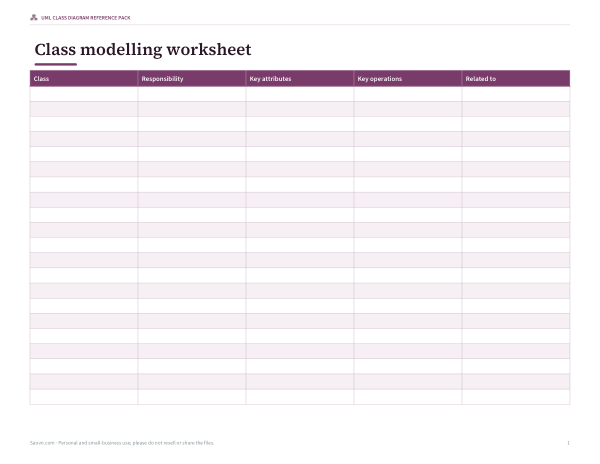
- Modelling worksheet (PDF/DOCX/XLSX)
- Review checklist (PDF/DOCX)
Formats: PDF, DOCX, XLSX. Instant download after payment (link valid 72 hours, up to 5 downloads). AI-assisted: the templates were drafted with AI help and reviewed and laid out before publishing.
$5.00 USD, one-time 4 files · about $1.25 each
- Instant download
- 7-day refund
- Secure checkout by Stripe
7-day money-back guarantee. Full refund within 7 days of purchase, even after you download.
Free sample: Class Modelling Worksheet (PDF, 50 KB)
Full refund within 7 days — see the refund policy and license.
Free printables
Single sheets you can print right now, no sign-up. The full pack adds every sheet in one download plus the editable files.
 Printable UML Class Diagram Review Checklist
Text syntax
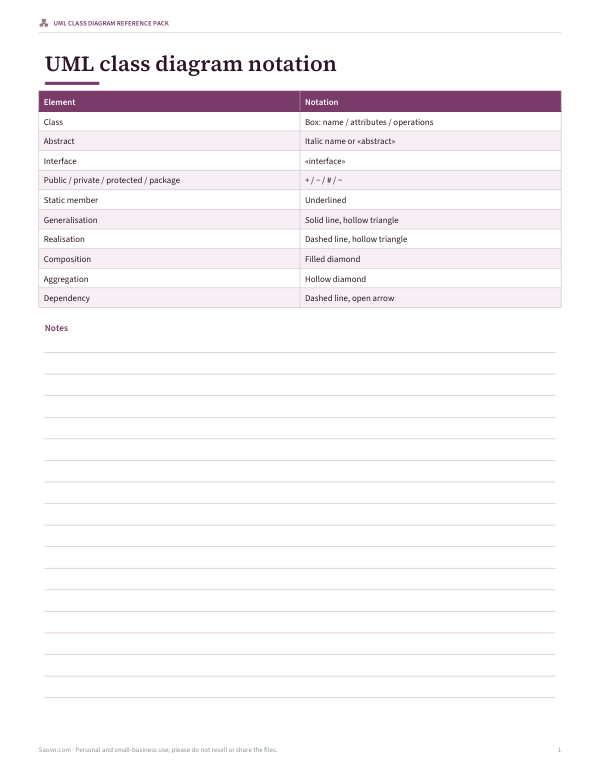
| Write | Means |
|---|---|
| class Name { … } | A class with attributes and methods on separate lines |
| abstract class Name | Abstract class (name shown in italics) |
| interface Name | Interface («interface») |
| enum Name { RED GREEN } | Enumeration |
| +name: Type | Public attribute (− private, # protected, ~ package) |
| +method(arg: Type): Return | Operation — any line with brackets |
| A <|-- B | B inherits from (generalises to) A |
| A <|.. B | B implements interface A |
| A *-- B | Composition: A owns B |
| A o-- B | Aggregation: A has B |
| A -- B | Association |
| A --> B | Directed association (navigable to B) |
| A ..> B | Dependency |
| A "1" -- "*" B : label | Multiplicities and a role label |
The syntax is similar to popular text-based diagram tools, so a model written here is easy to move later.
UML relationship notation
| Relationship | Line | End marker | Example |
|---|---|---|---|
| Generalisation (inheritance) | Solid | Hollow triangle at the parent | CardPayment is a Payment |
| Realisation | Dashed | Hollow triangle at the interface | CardPayment implements Refundable |
| Composition | Solid | Filled diamond at the whole | Order is made of OrderLines; lines don’t exist without the order |
| Aggregation | Solid | Hollow diamond at the whole | Order has a Payment that can exist separately |
| Association | Solid | None (or open arrow for navigability) | Customer places Orders |
| Dependency | Dashed | Open arrow | A class uses another temporarily |
Multiplicity
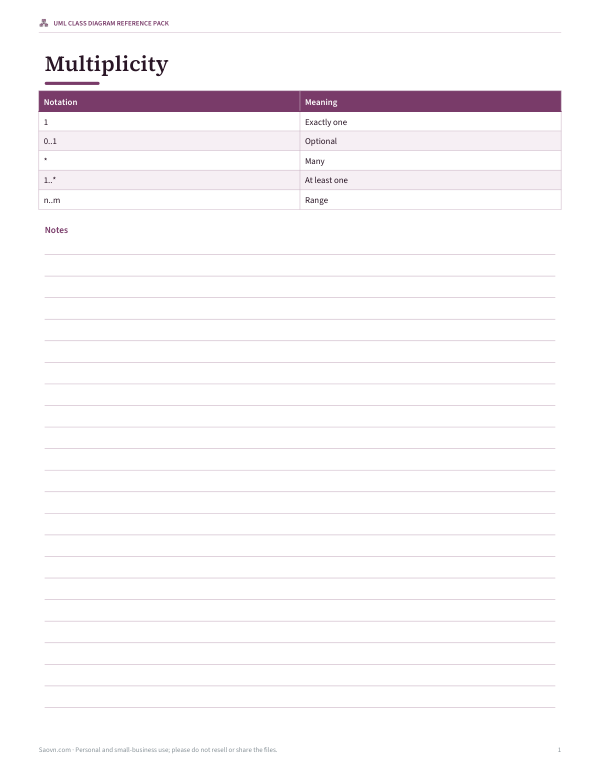
| Notation | Meaning |
|---|---|
| 1 | Exactly one |
| 0..1 | Zero or one |
| * | Zero or more |
| 1..* | One or more |
| 2..5 | Between two and five |
Multiplicities are written at the end of the line next to the class they describe: in Customer "1" -- "*" Order, each order has exactly one customer and each customer has zero or more orders.
Worked example: an online shop
The sample model describes a small ordering system. A Customer places many Orders; each Order is composed of one or more OrderLines, each pointing to exactly one Product. Payment is abstract with a concrete CardPayment subclass, which also implements the Refundable interface, and an Order aggregates its Payment. The layout puts parents and wholes above their parts, so inheritance arrows point upward and composition diamonds sit at the top of each relationship.
Good class diagram habits
- Model one topic per diagram; split large systems into packages.
- Show only the attributes and operations that matter for the diagram’s purpose.
- Name associations with verbs (“places”, “contains”) where the meaning isn’t obvious.
- Prefer composition only when the part truly can’t exist without the whole.
- Keep diagrams in version control as text — this format makes that easy.
Reading the sample diagram
Start at the top: Customer and the abstract Payment class sit on the first row because nothing above them owns or generalises them. Order appears below Customer with the label “places” and multiplicities 1 and *, read as “one customer places many orders”. The filled diamond on Order’s end of the line to OrderLine says an order is composed of its lines; the hollow diamond toward Payment says an order has a payment that could exist independently. CardPayment points up to Payment with a hollow triangle (inheritance) and to Refundable with a dashed line and hollow triangle (it implements that interface).
Visibility and types
| Symbol | Visibility | Typical use |
|---|---|---|
| + | Public | Operations other classes call |
| − | Private | Internal state such as IDs and caches |
| # | Protected | Members for subclasses |
| ~ | Package | Members shared within a module |
Types follow a colon (name: String) and operation return types follow the closing bracket (total(): Money). For early design sketches you can leave types out entirely; the diagram still draws.
Stereotypes and abstract classes
Guillemets such as «interface», «abstract» and «enumeration» are stereotypes — labels that extend UML’s basic vocabulary. Abstract class names are also shown in italics, as the diagram does for Payment. Teams sometimes add their own stereotypes like «entity» or «service» to show architectural roles; keep them consistent across diagrams.
From diagram to code
| Diagram | Typical code (Java-like) |
|---|---|
| class Order { -number: String } | class Order { private String number; } |
| Payment <|-- CardPayment | class CardPayment extends Payment |
| Refundable <|.. CardPayment | class CardPayment implements Refundable |
| Order *-- OrderLine | Order holds a list of OrderLine objects it creates and destroys |
| Order o-- Payment | Order refers to a Payment passed in from elsewhere |
| OrderLine --> Product | OrderLine has a field referencing a Product |
Class diagrams describe structure rather than behaviour, so they map naturally onto classes, fields and method signatures in object-oriented languages. They are equally useful for designing database tables, where associations with multiplicities become foreign keys and link tables.
When to draw a class diagram
- Planning a new feature or module before writing code.
- Explaining an existing codebase to new team members.
- Designing a domain model with non-developers — keep it at the concept level, without types and visibility.
- Documenting an API’s data structures.
- Preparing for exams in software engineering courses.
Limits of the automatic layout
The layout places classes in rows by their relationships and draws straight connectors, which keeps small and medium models (up to about 15–20 classes) readable. Very large or densely connected models may have crossing lines; splitting them into several diagrams usually helps more than manual placement. For full UML tooling — sequence diagrams, code generation, round-tripping — use a dedicated modelling tool.
Privacy
Your model is drawn entirely in your browser and never uploaded, so it’s safe for internal designs.
Frequently asked questions
How do I show inheritance in a UML class diagram?
A solid line with a hollow triangle pointing at the parent class; here, write Parent <|-- Child.
What is the difference between composition and aggregation?
In composition the part can’t exist without the whole (filled diamond); in aggregation it can (hollow diamond).
How do I show an interface?
Use «interface» and a dashed line with a hollow triangle for classes that implement it.
What do + and − mean?
Visibility: + public, − private, # protected, ~ package.
Can I export the diagram?
Yes, as SVG or PNG, or print it.
Is my model uploaded?
No. Everything stays in your browser.